mait.sh1.132.1

Private beta: features and content may change. No warranty; use at your own risk.

Use cases

Eight things you ask your agent to do on an Android device, from checking a web page on a phone to handing the device to another session.

Beta
Phone check

Check how a web page looks on a phone.

You want to know how your documentation or web app looks on a real phone screen, and you do not have a phone at hand.
Capturedmcp-scrcpy 0.3.5
YouOpen mait.sh/docs in Chrome on the phone and show me how it looks.
Tool callscrcpy_adopt { "deviceSerial": "emulator-5592" }
What happensReturns "adopted emulator-5592 for control".
Tool callscrcpy_start_app { "package": "com.android.chrome" }
Tool callscrcpy_screenshot { "deviceSerial": "emulator-5592" }
What happensThe picture shows Chrome's first-run page, "Make Chrome your own".
Tool callscrcpy_tap { "x": 540, "y": 2087 }
What happensTaps "Use without an account"; the next screen asks about an ad privacy feature.
Tool callscrcpy_tap { "x": 280, "y": 2231 }
Tool callscrcpy_tap { "x": 788, "y": 2231 }
What happensTaps "No thanks" and then "Got it"; Chrome shows its start page.
Tool callscrcpy_tap { "x": 540, "y": 644 }
Tool callscrcpy_text { "text": "mait.sh/docs" }
Tool callscrcpy_key { "key": "enter" }
Tool callscrcpy_screenshot { "deviceSerial": "emulator-5592" }
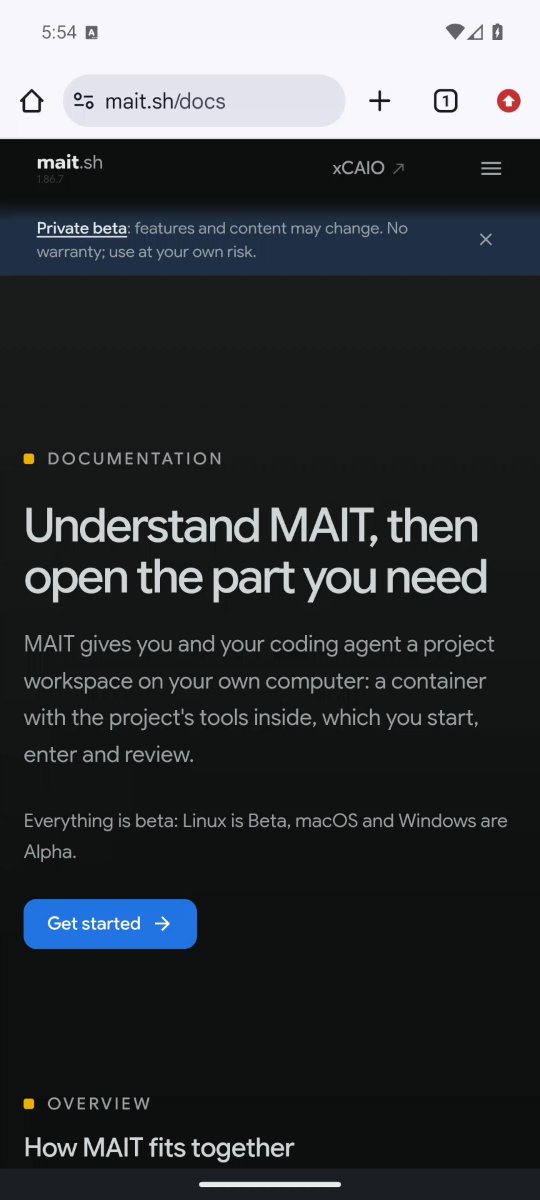
What happensThe first picture, taken a moment after Enter, shows a page still loading; the next one shows the documentation page.
AgentThe page loaded in Chrome at phone width. The heading and the Get started button fit; the navigation is behind a menu button.
The MAIT documentation page in Chrome on an Android emulator
A real capture of the run above: mait.sh/docs at phone width.
Menu and landscape

Open the menu and turn the phone sideways.

A layout can look right in portrait and wrong in landscape, or hide its navigation behind a button.
Capturedmcp-scrcpy 0.3.5
YouOpen the site menu, then show me the page in landscape.
Tool callscrcpy_tap { "x": 982, "y": 336 }
Tool callscrcpy_screenshot { "deviceSerial": "emulator-5592" }
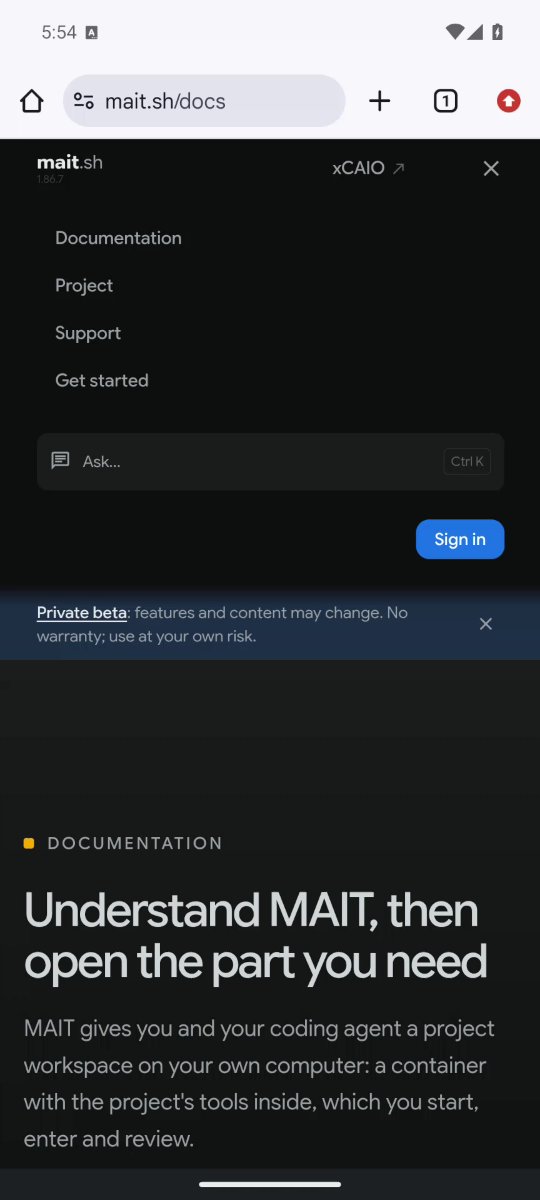
What happensThe menu lists Documentation, Project, Support and Get started, with a search box and a Sign in button.
Tool callscrcpy_tap { "x": 982, "y": 336 }
What happensThe menu closes.
Tool callscrcpy_rotate { "deviceSerial": "emulator-5592" }
What happensReturns "rotate sent".
Tool callscrcpy_screenshot { "deviceSerial": "emulator-5592" }
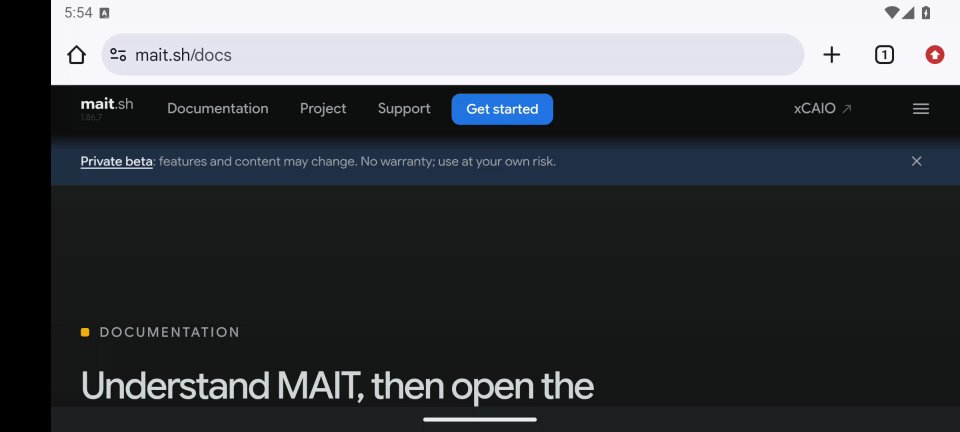
What happensA 1920 by 864 picture: the navigation now shows Documentation, Project, Support and Get started in a row instead of behind the menu button.
AgentIn portrait the navigation sits behind a menu button. In landscape it is a full bar.
The site menu open in portrait
A real capture: the menu in portrait.
The same page in landscape, with the navigation in a row
A real capture after turning the phone.

In this run the second turn kept the device in landscape, and a third brought it back to portrait. So after each turn the agent takes a picture and reads its size, then turns again if the orientation is still wrong.

Dark mode

Switch the phone to dark mode.

You want to see how an app looks with the phone's dark theme, which changes the system and browser colors.
Capturedmcp-scrcpy 0.3.5
YouTurn on the dark theme in Settings and show me the page again.
Tool callscrcpy_start_app { "package": "com.android.settings" }
Tool callscrcpy_tap { "x": 391, "y": 1985 }
What happensTaps "Display & touch". The first screenshot after a launch can still be blank, so the agent looks before it taps further.
Tool callscrcpy_screenshot { "deviceSerial": "emulator-5592" }
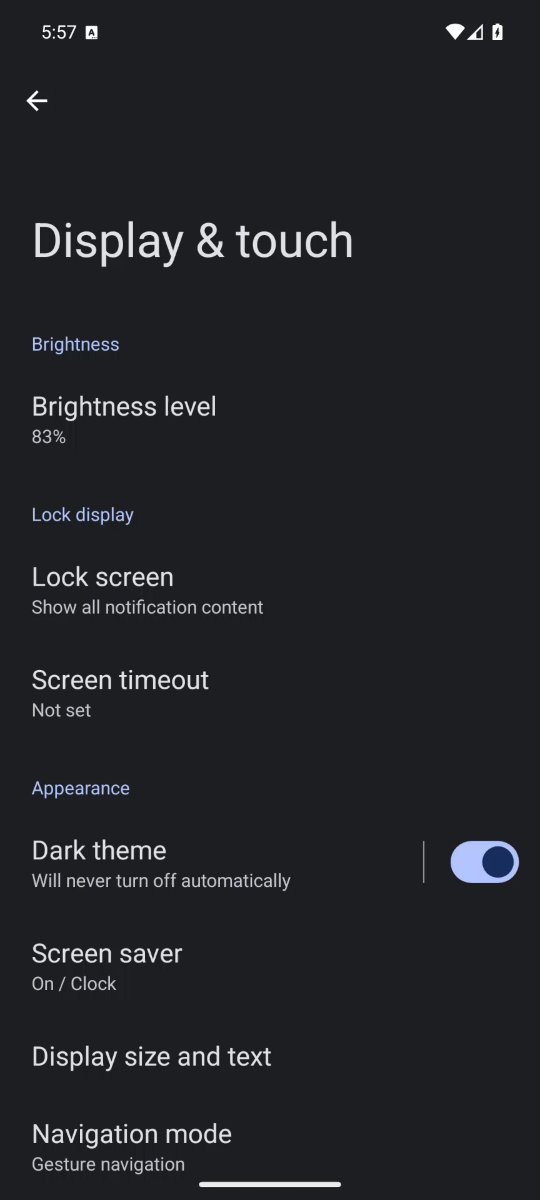
What happensDisplay & touch shows the Dark theme row with its switch.
Tool callscrcpy_tap { "x": 969, "y": 1722 }
What happensThe switch turns on and the screen turns dark.
Tool callscrcpy_start_app { "package": "com.android.chrome" }
Tool callscrcpy_screenshot { "deviceSerial": "emulator-5592" }
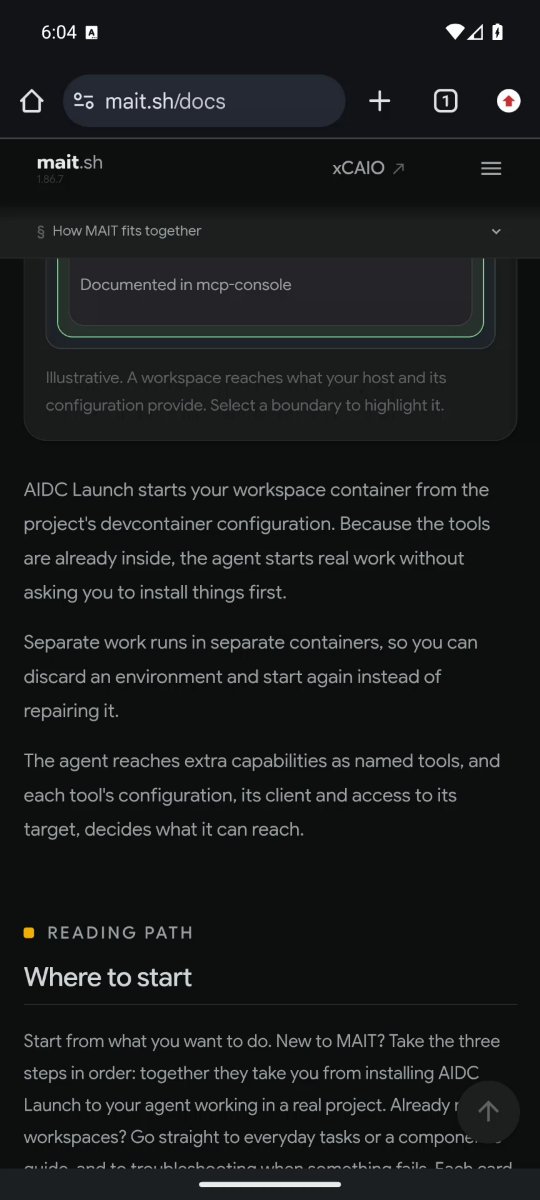
AgentThe dark theme is on. Chrome's address bar and buttons are dark, and the page keeps its own dark design.
The Dark theme switch turned on in Display and touch settings
A real capture: the Dark theme switch is on.
Chrome with the phone's dark theme on
A real capture: Chrome after the switch.
Record

Record the check as a short video, with sound.

You want to show someone what you checked, or keep proof of a bug that only appears on the phone, including a sound that should play.

Capturedmcp-scrcpy 0.3.5
YouRecord the check as a video with sound: open the menu on the support page, scroll to the bottom and switch the theme, then open the sound-check page and tap Play chime.
Tool callscrcpy_record_start { "deviceSerial": "emulator-5554", "condense": {}, "audio": true, "filename": "<absolute path>/phone-check.webm" }
What happensReturns "Recording started (Condensed)" with the file path.
Tool callscrcpy_tap { "x": 983, "y": 336 }
What happensThe menu button opens the page's navigation menu; a second tap on the same spot closes it.
Tool callscrcpy_swipe { "x1": 540, "y1": 2100, "x2": 540, "y2": 500, "durationMs": 150 }
What happensThe same swipe runs three times and the page reaches its footer.
Tool callscrcpy_tap { "x": 839, "y": 2196 }
What happensThe footer's theme button follows the phone and the page turns light; a second tap turns it dark again.
Tool callscrcpy_swipe { "x1": 540, "y1": 900, "x2": 540, "y2": 1500, "durationMs": 150 }
What happensChrome's address bar comes back.
Tool callscrcpy_tap { "x": 891, "y": 201 }
Tool callscrcpy_tap { "x": 800, "y": 875 }
What happensOpens the tab list and then the sound-check tab.
Tool callscrcpy_tap { "x": 540, "y": 1009 }
What happensThe Play chime button plays four short tones and the page shows Played. A second tap plays them again.
Tool callscrcpy_record_stop { "deviceSerial": "emulator-5554" }
What happensReturns status stopped and a summary: an 864 by 1920 VP9 and Opus file of about 440 KB and 30 seconds, with 127 frames encoded, 113 merged and 2 dropped.
AgentI saved phone-check.webm. It shows the menu, the page scrolling to its footer, the theme switching to light and back to dark, and the sound-check page; both chimes are on the sound track.
A real condensed recording of the run above, 30 seconds with sound. Every move in it was made by the agent through mcp-scrcpy. The chime is quiet: it sits about 40 dB below full scale, so turn the volume up to hear it.
Install app

Install an app and try it.

You have a build of your app and want it running on a device, without opening a terminal.
Capturedmcp-scrcpy 0.3.5
YouInstall the sample app, open it, type an order note into the field and long-press the button.
Tool callscrcpy_install_apk { "deviceSerial": "emulator-5592", "apkPath": "/absolute/path/sample-app.apk" }
What happensReturns "installed" with the path.
Tool callscrcpy_start_app { "package": "com.example.helloclaude" }
What happensReturns "started com.example.helloclaude". If a start call reports an error, check the screen or the log before repeating it, because the app may already be running.
Tool callscrcpy_tap { "x": 540, "y": 232 }
Tool callscrcpy_long_press { "x": 540, "y": 405, "durationMs": 800 }
Tool callscrcpy_text { "text": "Order 1042 shipped" }
Tool callscrcpy_screenshot { "deviceSerial": "emulator-5592" }
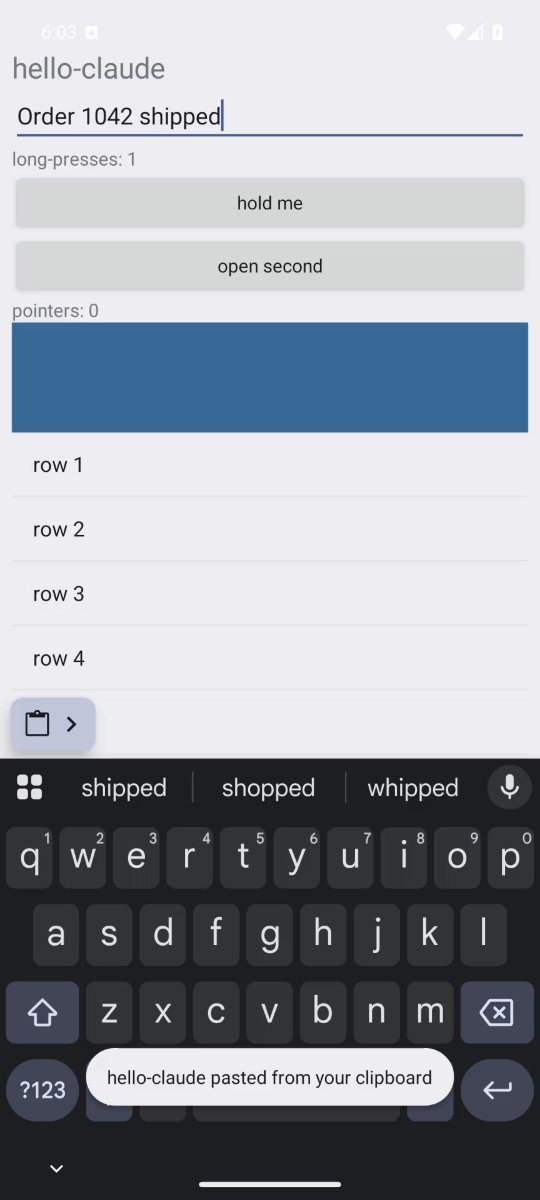
What happensThe field holds "Order 1042 shipped" and the label above the button reads "long-presses: 1".
AgentThe app is installed and open. The note is in the field and the long press registered once.
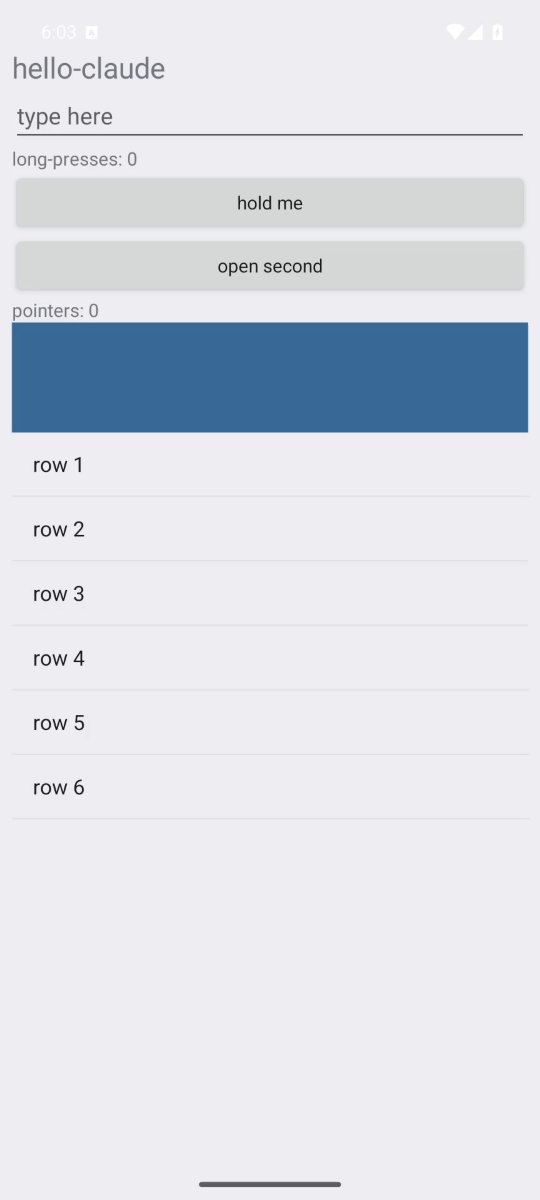
The sample app before any input
A real capture: the sample app right after it started.
The sample app with the note typed and one long press counted
A real capture after the typing and the long press.
Logs

Read what the device logged.

The app misbehaved, or you want proof that it really started, and you want the log lines from the last few seconds.

Capturedmcp-scrcpy 0.3.5
YouWhat did Android log about starting the sample app?
Tool callscrcpy_logcat_tail { "deviceSerial": "emulator-5592", "lines": 400, "tag": "ActivityTaskManager" }
What happensReturns the lines for that tag. One reads "START u0 {act=android.intent.action.MAIN cat=[android.intent.category.LAUNCHER] ... cmp=com.example.helloclaude/.MainActivity} ... result code=0", and the next, "Displayed com.example.helloclaude/.MainActivity for user 0: +1s207ms".
AgentThe app started once and took about 1.2 seconds to show its first screen. A later start request found it already running.
Wireless

Use a phone over Wi-Fi.

The device is on your desk with no cable, or it is a different device than the one connected by USB.

Illustrative conversation
YouWhich of my devices are connected over Wi-Fi?
Tool callscrcpy_wireless_devices {}
What happensReturns one device whose identifier is an address and port, such as 192.168.1.20:37123.
AgentOne phone is connected over Wi-Fi. I will use that identifier for the next calls.
Hand over

Hand the device to another session.

One agent finished its test and another should run the next one on the same device.

Capturedmcp-scrcpy 0.3.5
YouPut the device back on its home screen and release it so the other session can use it.
Tool callscrcpy_key { "deviceSerial": "emulator-5592", "key": "home" }
What happensReturns "key sent"; the device is left on its home screen.
Tool callscrcpy_unadopt { "deviceSerial": "emulator-5592" }
What happensReturns "unadopted emulator-5592".
AgentThe device is released and on its home screen. The other session can adopt it now.